5 Steps How to Fix Tech Neck and Forward Head Posture (Easy Guide for San Jose Desk Workers)
Published: September 18, 2026

If you work at a desk in San Jose or Silicon Valley, your neck may spend more time looking at a screen than looking at the horizon. Long hours at a laptop, frequent phone use, and limited movement can gradually encourage forward head posture, commonly called "tech neck."
Some office-worker reports cite neck pain rates of approximately 58.6%, while forward head posture has been reported in up to 85.4% of certain computer-using or neck-pain populations. These numbers vary by study design, age group, and how posture is measured. They are best understood as a reminder that neck discomfort is common among desk workers, not as a reason for alarm.
The good news is that posture is adaptable. With better workstation positioning, regular movement, targeted exercises, and a professional evaluation when necessary, you can reduce the external forces that interfere with comfortable spinal function.
What Is Tech Neck and Forward Head Posture?
Forward head posture occurs when the head rests in front of the shoulders instead of being balanced over the cervical spine. The condition often develops during prolonged screen use, particularly when a monitor is too low or a laptop is placed directly on a desk.
The cervical spine contains seven vertebrae, supporting muscles, ligaments, joints, and nerve roots. When the head moves forward, the posterior cervical muscles, upper trapezius, levator scapulae, and thoracic stabilizers must work continuously to prevent the head from falling farther forward. Over time, this sustained load may contribute to neck stiffness, headaches, upper-back tension, restricted mobility, and shoulder discomfort.
Posture is only one part of the picture. The duration of a position, sleep quality, stress, physical conditioning, and workload also influence symptoms. There is no single perfect posture that must be held all day. The body functions best when it has support, alignment, and frequent opportunities to move.

Step 1: Reset Your Screen and Device Position
The first solution is to reduce the external forces that pull your head forward.
For a desktop monitor, use these practical guidelines:
- Position the screen approximately 20 to 30 inches away, or about arm's length.
- Place the top of the usable screen close to eye level.
- Allow your eyes to look slightly downward without bending your neck.
- Keep the monitor centered directly in front of you.
- Raise a laptop on a stand and use a separate keyboard and mouse.
When a screen is too low, the cervical spine remains flexed for extended periods. When it is too far away, the head and shoulders gradually drift toward the monitor. A proper setup allows the eyes to move without requiring the entire head to lead the movement.
Also raise your phone or tablet closer to eye level. Looking down for several uninterrupted minutes may not create an injury by itself, but repeating the position throughout the workday increases cumulative muscular demand.
Our San Jose home-office ergonomics guide provides additional recommendations for chair height, desk position, lighting, and keyboard placement.
Step 2: Use the 90-90-90 Sitting Principle as a Starting Point
The 90-90-90 principle is a simple way to organize your workstation:
- Hips positioned at approximately 90 degrees.
- Knees positioned at approximately 90 degrees.
- Elbows positioned near 90 degrees while typing.
- Feet supported on the floor or on a footrest.
This is not a rigid posture test. Individual body proportions differ, and comfort matters. The goal is to avoid extreme joint angles while creating a stable foundation for the spine.
Sit with your pelvis supported by the chair, your lower back in a comfortable neutral position, and your shoulders relaxed. Keep the keyboard and mouse close enough that you do not reach forward. Your wrists should remain relatively straight, and your elbows should stay near your sides rather than drifting outward.
The pelvis and thoracic spine provide the foundation for the cervical spine. When the lower back collapses or the shoulders round forward, the head often follows. Improving the position below the neck can therefore reduce the need to force the head backward.
Step 3: Interrupt Static Screen Time With the 20-20-20 Rule
The nervous system serves as the body's master controller, coordinating visual focus, muscle tone, balance, and movement. It does not respond well to hours of uninterrupted static loading.
Use the 20-20-20 rule as a practical reminder:
- Every 20 minutes, look at something approximately 20 feet away.
- Continue looking for at least 20 seconds.
- During that pause, relax your jaw, lower your shoulders, and gently move your neck.
The 20-20-20 rule was developed primarily to reduce digital eye strain. It is not a complete neck-pain treatment, but it creates a useful interruption in prolonged screen focus. Add a brief movement break every 30 to 60 minutes. Stand, walk, rotate your shoulders, or change to a standing workstation for a few minutes.
Avoid treating the 90-90-90 principle as permission to remain still. A well-designed chair cannot replace movement. The most effective ergonomic position is the next position.
Step 4: Restore Mobility and Strength in the Neck and Upper Back
Forward head posture often involves reduced endurance in the deep cervical flexor muscles and decreased support from the scapular stabilizers. Gentle exercises can help restore coordination, but they should remain comfortable and controlled.
Gentle chin tuck
Sit or stand tall. Glide your head straight backward as though making a small double chin. Do not look up or force the neck into extension. Hold for three to five seconds, then relax. Repeat five to ten times.
Scapular setting
Allow your arms to rest by your sides. Gently draw your shoulder blades down and slightly together without shrugging. Hold for three to five seconds, then release. Repeat eight to ten times.
Chest and anterior shoulder stretch
A tight pectoralis minor and pectoralis major can encourage the shoulders to round forward. Use a doorway or corner stretch with a comfortable range of motion. Keep the movement gentle and avoid forcing the shoulders backward.
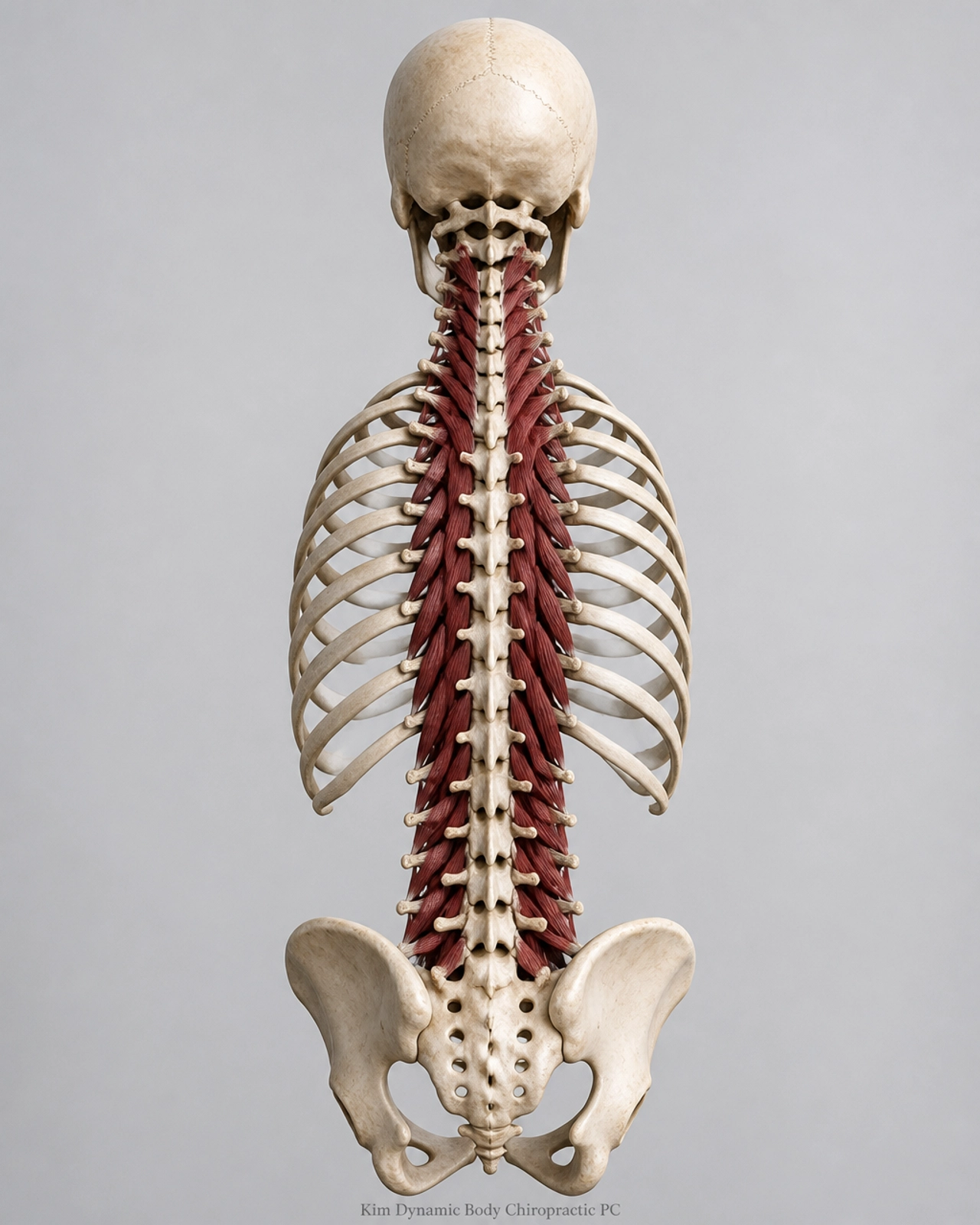
Our exercise and recovery library includes educational resources for posture, mobility, and spinal support. The following image shows the posterior spinal musculature that helps support the vertebral column. It is not a diagram of every muscle involved in forward head posture.
Stop an exercise if it increases radiating pain, numbness, tingling, dizziness, or weakness. A professional should individualize exercise selection when symptoms are persistent or associated with an injury.
Step 5: Schedule an In-Office Evaluation for Persistent Neck Pain
Home changes are valuable, but they do not replace an assessment when symptoms continue. A neck pain specialist in San Jose can evaluate more than the visible position of your head.
At Kim Dynamic Body Chiropractic, P.C., an evaluation may include assessment of:
- Cervical range of motion.
- Thoracic mobility and shoulder mechanics.
- Deep neck flexor and scapular muscle endurance.
- Postural loading during sitting and standing.
- Neurological symptoms such as numbness, tingling, or weakness.
- The effect of previous injuries, sports activity, or motor vehicle accidents.
When clinically appropriate, our office also has digital radiography on site for acute injuries and specific diagnostic concerns. Chiropractic care, corrective exercise, massage therapy, and daily ergonomics education may be combined according to the findings.
This approach complements our existing ergonomics education and reverse-neck-curve content. The objective is not to force your body into a rigid shape. It is to identify the internal and external factors affecting spinal function, reduce unnecessary strain, and restore more efficient movement.

When Should You Seek Care?
Schedule an evaluation if neck pain persists despite workstation changes, repeatedly returns during the workday, limits your range of motion, or is accompanied by frequent headaches or upper-back discomfort.
Seek prompt medical attention for significant weakness, loss of coordination, severe pain after trauma, new bowel or bladder changes, or numbness that rapidly progresses.
For most desk workers, the first step is practical: raise the screen, support the feet, relax the shoulders, take regular movement breaks, and gradually strengthen the muscles that support the cervical and thoracic spine.
If you work in San Jose, Santa Clara, Milpitas, Fremont, Cupertino, Los Gatos, or Sunnyvale and want a personalized plan, contact Kim Dynamic Body Chiropractic, P.C. for an in-office evaluation. Call (408) 899-2288 or visit www.dynamicbodychiro.com.
Posture is adaptable. Our team provides chiropractic care, massage therapy, fitness guidance, ergonomic education, and rehabilitation support for individuals and families in San Jose, Santa Clara, Milpitas, Fremont, Cupertino, Los Gatos, and Sunnyvale.
Call Now